
How to upload an application on Portal
Generally speaking XR application will work out-of-the-box with Innoactive Portal. There is no need for customization, integration of external SDKs or further implementation, as long as your project follows these requirements and you are aware of these exceptions.
Supported application formats
You can upload:
APK files (for Android-based XR devices)
ZIP archives containing a desktop executable (for Windows streaming)
Each uploaded application can have multiple versions.
Step-by-step
Open Control Panel
In Portal, open the user menu and select Control Panel.Open Application Management
Navigate to Applications.Start application upload
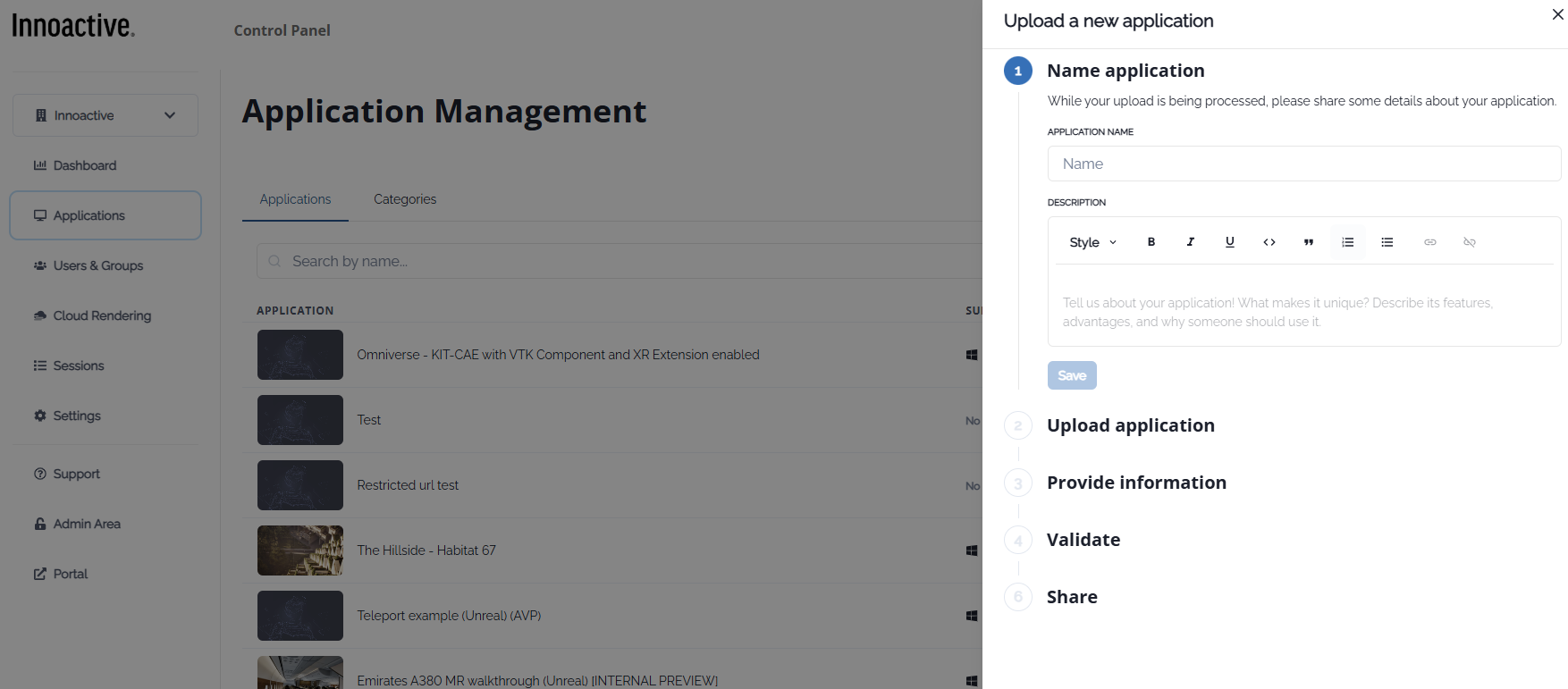
Click Upload application.Name the application
Enter an Application name.
(Optional) Add a description to help users understand its purpose.
Upload the application file
Upload an APK, or
Upload a ZIP archive containing the executable and all required files.
Provide application information
Define runtime-related information such as executable path, launch behavior, and optional arguments.Validate the application
Portal validates the package to ensure it can be streamed correctly.Share the application
Assign application permissions to user groups to control who can see and stream it.
Notes
Uploading an application does not automatically grant access to users.
Access is controlled via application permissions and user groups.
Multiple versions of the same application can coexist.