
Innoactive Spatial Runtime – Processes and Networking Overview
This page documents the processes installed by Innoactive Spatial Runtime and the network ports and IPC mechanisms each one uses. For firewall configuration guidance on a CloudXR workstation, see Firewall settings for CloudXR Server workstations.
Default installation directories:
Main app + CloudXR binaries:
C:\ProgramData\Innoactive\Spatial Runtime\OpenXR Runtime Service:
C:\Program Files\Innoactive\OpenXR Runtime Service\
Architecture overview
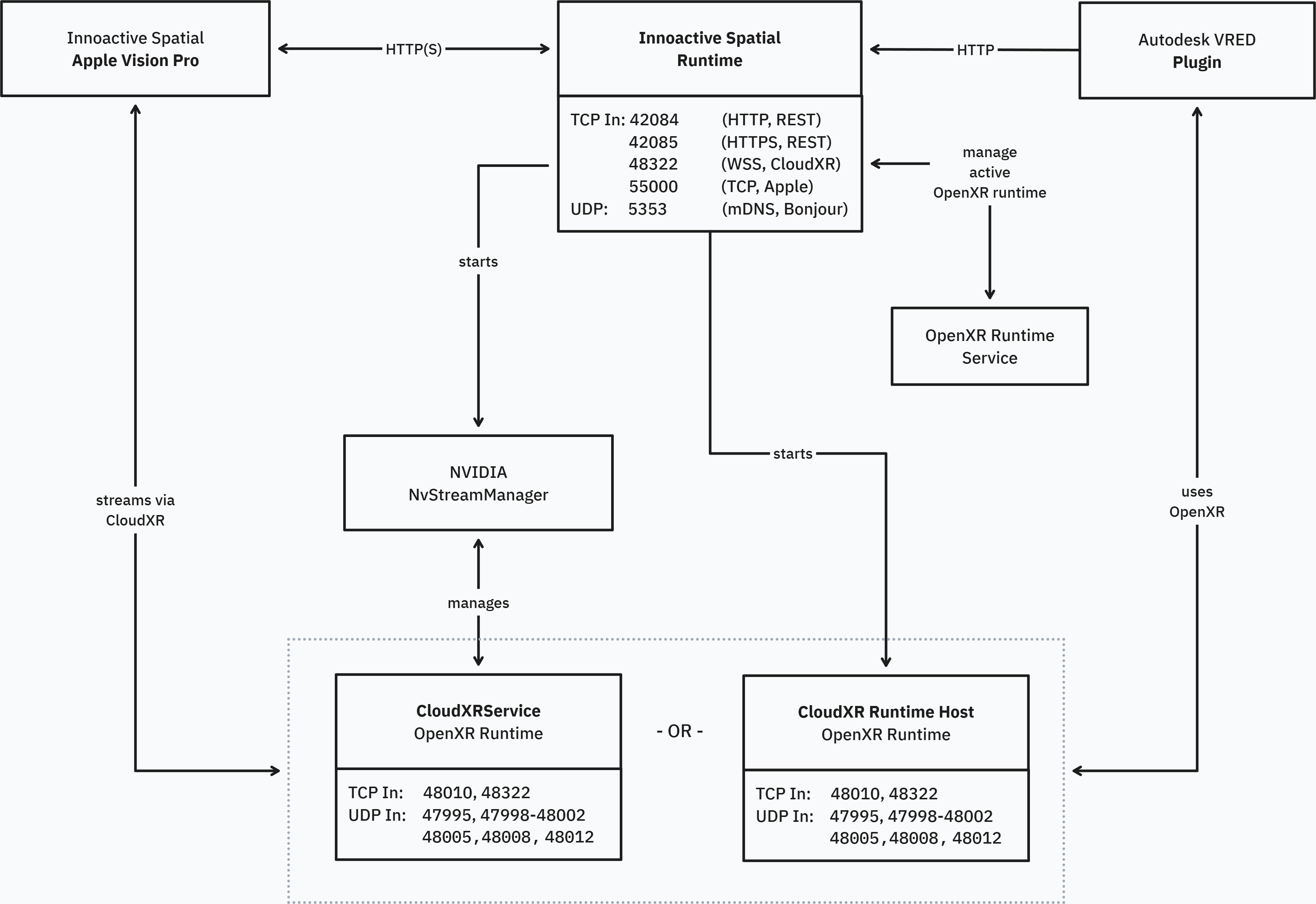
Notes
Only one of
CloudXR Runtime Host.exeorCloudXrService.exeowns the CloudXR ports at a time, depending on the active streaming strategy.CloudXrService.exe if using Apple’s Foveated Streaming Sessions framework for dynamic foveation
CloudXR Runtime Host.exe if using static foveation
1. Innoactive Spatial Runtime
ProcessC:\ProgramData\Innoactive\Spatial Runtime\Innoactive Spatial Runtime.exe
Networking
TCP (Inbound):
42084— REST API (HTTP)42085— REST API (HTTPS)48322— WebSocket Secure (WSS) signaling proxy for CloudXR55000— Apple Vision Pro Foveated Streaming session management (QR pairing)
UDP (Inbound + Outbound):
5353— mDNS / Bonjour service discovery (multicast224.0.0.251), service type_innoactive._tcp
Explanation
Tray application that coordinates connections from application plugins and client applications.
Starts and stops CloudXR streaming via
NvStreamManager.exe.IPC:
Named pipe to
NvStreamManagerNamed pipe to
CloudXR Runtime Host(Direct streaming strategy)Named pipe to
Innoactive OpenXR Runtime Service(OpenXR registry updates)
The REST API ports (42084, 42085) and Apple Vision Pro session management port (55000) are configurable via appsettings.json.
2. Innoactive OpenXR Runtime Service
ProcessC:\Program Files\Innoactive\OpenXR Runtime Service\Innoactive OpenXR Runtime Service.exe
Service details
Service name:
InnoactiveOpenXRRuntimeServiceDisplay name: Innoactive OpenXR Runtime Service
Account:
LocalSystemStart type: Automatic
Networking
None.
Explanation
Installed under Program Files (not ProgramData) to prevent binary replacement by standard users.
Allows switching the active OpenXR runtime without administrator privileges — recommended for enterprise deployments where users don't have admin rights.
IPC via a local named pipe to the Spatial Runtime tray app.
3. NvStreamManager
ProcessC:\ProgramData\Innoactive\Spatial Runtime\CloudXR\NvStreamManager.exe
Networking
None.
Explanation
Provided by NVIDIA.
Manages CloudXR lifecycle and coordination.
IPC:
With
CloudXrService/CloudXR Runtime Host(named pipe)With Spatial Runtime (named pipe)
4. CloudXR Runtime Host
ProcessC:\ProgramData\Innoactive\Spatial Runtime\CloudXR\CloudXR Runtime Host.exe
Networking
TCP (Inbound):
48010,48322TCP (Outbound):
49007UDP (Inbound):
47995,47998–48002,48005,48008,48012UDP (Outbound):
49003–49006,50000–55000
Explanation
Out-of-process host that owns the CloudXR network ports in the Direct streaming strategy.
IPC with Spatial Runtime via a local named pipe.
5. CloudXrService
ProcessC:\ProgramData\Innoactive\Spatial Runtime\CloudXR\CloudXrService.exe
Networking
Identical to CloudXR Runtime Host (§4):
TCP (Inbound):
48010,48322TCP (Outbound):
49007UDP (Inbound):
47995,47998–48002,48005,48008,48012UDP (Outbound):
49003–49006,50000–55000
Explanation
Provided by NVIDIA.
Owns the CloudXR network ports in the AppleManaged / Stream Manager streaming strategy.
Only one of
CloudXR Runtime Host.exeorCloudXrService.exeowns these ports at any given time, depending on the active streaming strategy.Official NVIDIA network documentation: https://docs.nvidia.com/cloudxr-sdk/latest/requirement/network_setup.html
6. VRED Plugin (or other application plugin)
Process
Plugin running inside VRED (or other supported host applications).
Networking
TCP (Outbound):
42084
Explanation
Connects to Spatial Runtime's REST API.
Enables application registration, client discovery, and XR mode activation.
Related: VRED ports (third-party)
These ports are opened by Autodesk VRED itself, not by Spatial Runtime. Included here for operator awareness when VRED is used as an application host.
Component | Protocol | Default Port | Notes |
|---|---|---|---|
VRED Web Interface | TCP | 8888 | Browser-based VRED UI |
VRED Collaboration | TCP | 8889 | Multi-user collaboration; port is configurable in VRED |